/* [ARMCC] retarget the C library printf function to the USART */
int fputc(int ch, FILE *f)
{
    USART_Data_Send(USART2, (uint8_t)ch);
    while (USART_Flag_Status_Get(USART2, USART_FLAG_TXDE) == RESET)
        ;
    return (ch);
}

/* [GCC] retarget the C library printf function to the USART */
int _write(int file, char *data, int len)
{
    // if ((file != STDOUT_FILENO) && (file != STDERR_FILENO))
    // {
    //     errno = EBADF;
    //     return -1;
    // }
    for (int i = 0; i < len; i++) {
        USART_Data_Send(USART2, data[i]);
        while (USART_Flag_Status_Get(USART2, USART_FLAG_TXDE) == RESET)
            ;
    }
    return 0;
}
#if !defined(__CROSSWORKS_ARM) && defined(__GNUC__)

#include
#include

int _close(int file);
void _exit(int status);
int _fstat(int file, struct stat *st);
int _getpid(void);
int _isatty(int file);
int _kill(int pid, int sig);
int _lseek(int file, int ptr, int dir);
int _read(int file, char *ptr, int len);
int _write(int file, const char *ptr, int len);

/**************************************************************************//**
* Close a file.
*
* @param[in] file File you want to close.
*
* @return Returns 0 when the file is closed.
*****************************************************************************/
int _close(int file)
{
  (void) file;
  return 0;
}

/**************************************************************************//**
* Exit the program.
*
* @param[in] status The value to return to the parent process as the
* exit status (not used).
*****************************************************************************/
void _exit(int status)
{
  (void) status;
  while (1) {
  } // Hang here forever...
}

/**************************************************************************//**
* Status of an open file.
*
* @param[in] file Check status for this file.
*
* @param[in] st Status information.
*
* @return Returns 0 when st_mode is set to character special.
*****************************************************************************/
int _fstat(int file, struct stat *st)
{
  (void) file;
  st->st_mode = S_IFCHR;
  return 0;
}

/**************************************************************************//**
* Get process ID.
*
* @return Return 1 when not implemented.
*****************************************************************************/
int _getpid(void)
{
  return 1;
}

/**************************************************************************//**
* Query whether output stream is a terminal.
*
* @param[in] file Descriptor for the file.
*
* @return Returns 1 when query is done.
*****************************************************************************/
int _isatty(int file)
{
  (void) file;
  return 1;
}

/**************************************************************************//**
* Send signal to process.
*
* @param[in] pid Process id (not used).
*
* @param[in] sig Signal to send (not used).
*****************************************************************************/
int _kill(int pid, int sig)
{
  (void)pid;
  (void)sig;
  return -1;
}

/**************************************************************************//**
* Set position in a file.
*
* @param[in] file Descriptor for the file.
*
* @param[in] ptr Poiter to the argument offset.
*
* @param[in] dir Directory whence.
*
* @return Returns 0 when position is set.
*****************************************************************************/
int _lseek(int file, int ptr, int dir)
{
  (void) file;
  (void) ptr;
  (void) dir;
  return 0;
}

/**************************************************************************//**
* Read from a file.
*
* @param[in] file Descriptor for the file you want to read from.
*
* @param[in] ptr Pointer to the chacaters that are beeing read.
*
* @param[in] len Number of characters to be read.
*
* @return Number of characters that have been read.
*****************************************************************************/
int _read(int file, char *ptr, int len)
{
  (void)file;

  return readBuffer(ptr, len);
}

/**************************************************************************//**
* Write to a file.
*
* @param[in] file Descriptor for the file you want to write to.
*
* @param[in] ptr Pointer to the text you want to write
*
* @param[in] len Number of characters to be written.
*
* @return Number of characters that have been written.
*****************************************************************************/
int _write(int file, const char *ptr, int len)
{
  (void)file;

  return writeBuffer(ptr, len);
}

#endif /* !defined( __CROSSWORKS_ARM ) && defined( __GNUC__ ) */
在自己的程序中,只需实现:
int writeBuffer(char *ch, int length);
int readBuffer(char *ch, int length);
2、keil开发环境
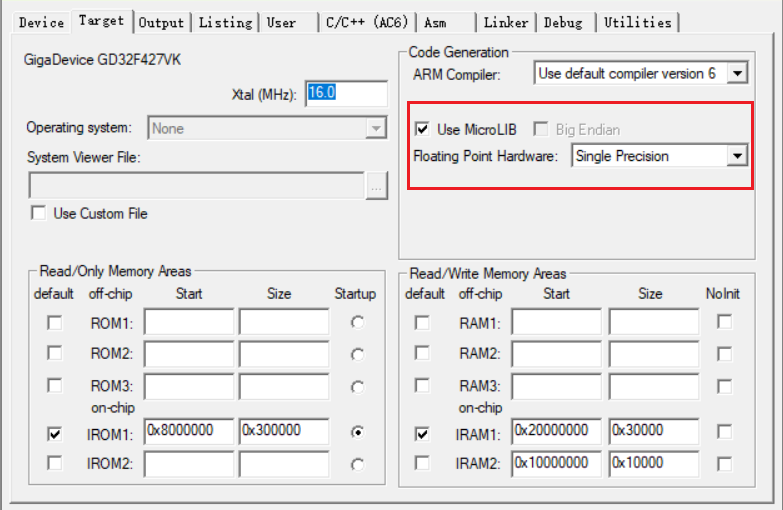
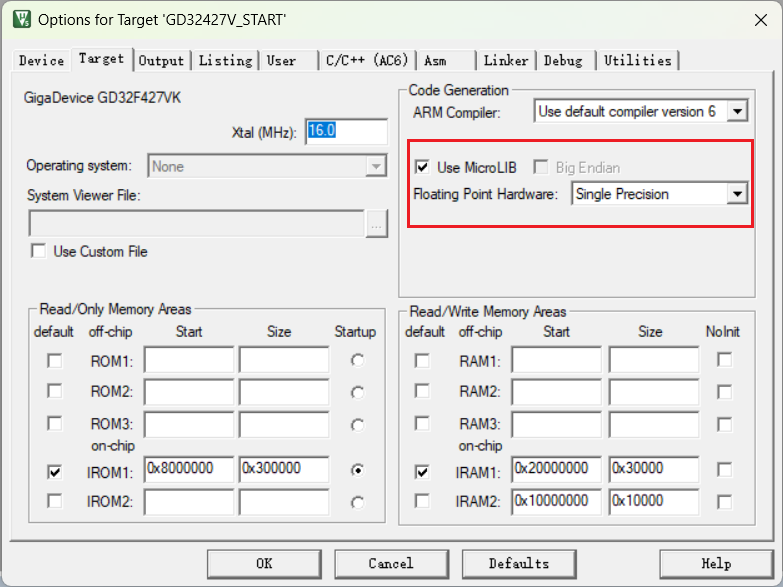
2.1、使用MicroLib
在代码中实现fputc函数
// 重定向printf
int fputc(int ch, FILE *f){
  HAL_UART_Transmit(&huart1, (uint8_t *)&ch, 1, 1000);
  return ch;
}

// 重定向getchar
int fgetc(FILE *f)
{
  int ch;
  while (__HAL_UART_GET_FLAG(&huart1, UART_FLAG_RXNE) == RESET);
  HAL_UART_Receive(&huart1, (uint8_t *)&ch, 1, 0xFFFF);
  return (ch);
}
2.2、使用非半主机模式
新建syscalls.c
#if defined(__CC_ARM)
/******************************************************************************/
/* RETARGET.C: 'Retarget' layer for target-dependent low-level functions */
/******************************************************************************/
/* This file is part of the uVision/ARM development tools. */
/* Copyright (c) 2005-2006 Keil Software. All rights reserved. */
/* This software may only be used under the terms of a valid, current, */
/* end user licence from KEIL for a compatible version of KEIL software */
/* development tools. Nothing else gives you the right to use this software. */
/******************************************************************************/

#include

#pragma import(__use_no_semihosting_swi)

struct __FILE{
  int handle;
};

//Standard output stream
FILE __stdout;

/**************************************************************************//**
* Writes character to file
*
* @param[in] f File
*
* @param[in] ch Character
*
* @return Written character
*****************************************************************************/
int fputc(int ch, FILE *f)
{
  return putChar(ch);
}

/**************************************************************************//**
* Reads character from file
*
* @param[in] f File
*
* @return Character
*****************************************************************************/
int fgetc(FILE *f)
{
return getChar();
}

/**************************************************************************//**
* Tests the error indicator for the stream pointed to by file
*
* @param[in] f File
*
* @return Returns non-zero if it is set
*****************************************************************************/
int ferror(FILE *f)
{
  // Your implementation of ferror
  return EOF;
}

/**************************************************************************//**
* Writes a character to the console
*
* @param[in] ch Input character
*****************************************************************************/
void _ttywrch(int ch)
{
  putChar(ch);
}

/**************************************************************************//**
* Library exit function. This function is called if stack overflow occurs.
*
* @param[in] return_code Return code
*****************************************************************************/
void _sys_exit(int return_code)
{
  label: goto label; // endless loop
}

#endif /* defined( __CC_ARM ) */
# Number of servers to start up
#RPCNFSDCOUNT=8
RPCNFSDCOUNT="-V 2 8"

# Runtime priority of server (see nice(1))
RPCNFSDPRIORITY=0

# Options for rpc.mountd.
# If you have a port-based firewall, you might want to set up
# a fixed port here using the --port option. For more information,
# see rpc.mountd(8) or http://wiki.debian.org/SecuringNFS
# To disable NFSv4 on the server, specify '--no-nfs-version 4' here
#RPCMOUNTDOPTS="--manage-gids"
RPCMOUNTDOPTS="-V 2 --manage-gids"

# Do you want to start the svcgssd daemon? It is only required for Kerberos
# exports. Valid alternatives are "yes" and "no"; the default is "no".
NEED_SVCGSSD=""

# Options for rpc.svcgssd.
#RPCSVCGSSDOPTS=""
RPCSVCGSSDOPTS="--nfs-version 2,3,4 --debug --syslog"
Zephyr是专门面向微控制器(MCU)的实时操作系统。经过很多年的发展,现在的Zephyr已经能够很好的支持多种架构的CPU以及很多厂家的芯片,包括大家熟悉的STM32、GD32、NRF、ESP32等系列的芯片,大有成为MCU界的Linux之势。而事实上现在的Zephyr也是由Linux基金会和Wind River Systems Inc(Intel旗下的子公司)共同管理。在Zephyr身上确实也能看到Linux的影子,比如设备树,没错,Zephyr上也有设备树,不过Zephyr的设备树和Linux的设备树不能说有所不同,只能说完全不同。受限于MCU平台的资源,Zephyr的设备树不像Linux中会有单独的文件和设备树系统。而是在编译阶段发挥作用,在预编译阶段脚本会把.dts中的内容以宏定义的形式生成.h文件。
west flash 可以直接将编译后的代码烧写到板子中,但是在实际情况中经出会遇到比如编译是在统一的云服务器中,或者主机没办法连接调试器,这就需要我们将文件从服务器copy到本地用对应的烧写工具烧写。这里推荐一个叫做NetDrive2的软件,可以很方便的将服务器的文件夹映射成为本地磁盘,当然还有很多别的方式,这里用自己最熟悉的就可以。



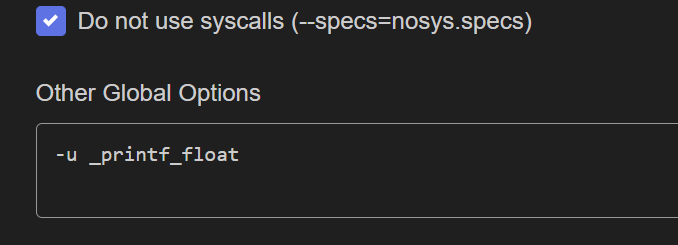
![EIDE [Builder Options]下[Global Options]说明](https://www.guoxingyong.net/wp-content/uploads/2026/04/PixPin_2026-04-03_11-10-42-825x510.png)